Web previews support review
A responsive preview should look sharp in the gallery while loading efficiently on common screens and mobile connections. It is there to help the client browse and decide.
Image sizes for delivery
Understand when to use lightweight web previews and when clients need high-resolution photo files. Plan a clear delivery workflow without claiming an online resize tool.
Quick answer
Client delivery usually needs two different things: images that load quickly while a client browses, and final files that are appropriate for the agreed use. GalleryDock helps photographers present web-friendly gallery views and release the intended downloads, but it is not an online image-resizing editor. You prepare the exports; the gallery keeps preview and delivery roles clear.
Two jobs, two file decisions
The preview must make the collection pleasant to browse. The delivered file must meet the client’s licensed purpose. Treating those as separate decisions prevents slow galleries, unnecessary transfer weight, and confusion about what the client may use.
A responsive preview should look sharp in the gallery while loading efficiently on common screens and mobile connections. It is there to help the client browse and decide.
A final export may be needed for print, internal archives, press use, or design work. Its dimensions, compression, and color profile should follow the assignment—not a universal number.
Tell the client which option is intended for social media, websites, print, or safekeeping. A short explanation prevents the wrong file from being uploaded or sent to a printer.
A reliable export plan
There is no single perfect pixel dimension for every client. A headshot used on a company website, a campaign file sent to a designer, and a family photograph ordered as a large print have different requirements.
01
Identify whether the client needs web publishing, social sharing, presentation use, print production, an internal archive, or a mix of those outcomes.
02
Create the variants your agreement requires. Keep filenames and folders understandable so the client can distinguish web-ready files from full-resolution delivery.
03
Use the gallery experience for viewing and orientation. Clients can see the full set without downloading every original before they know what they need.
04
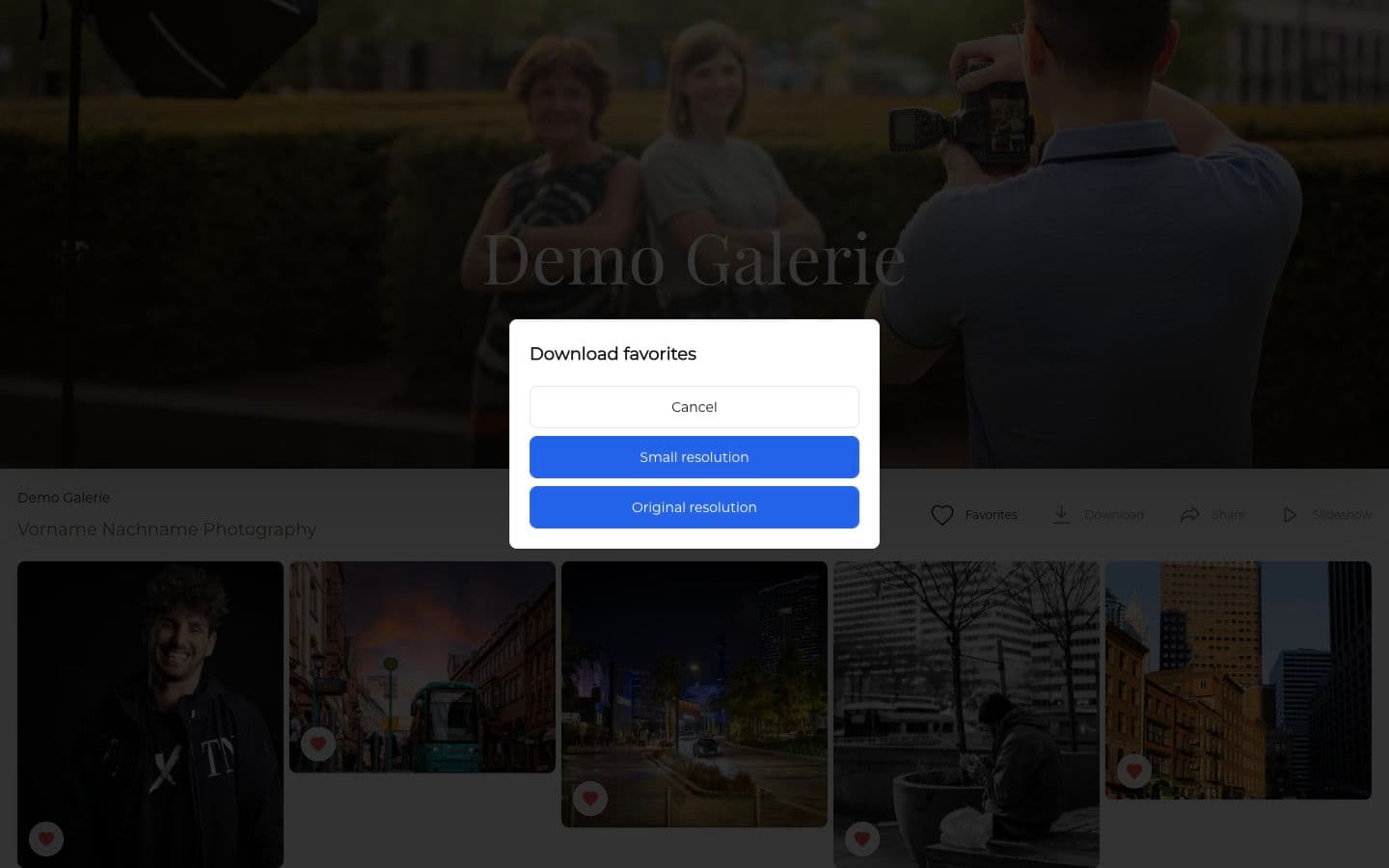
Make the intended files available and explain their purpose. GalleryDock can present small and original resolution choices when that matches your delivery setup.
Quality without confusion
Smaller previews do not mean the final photography is low quality. They keep browsing responsive. The important part is that the client understands when a preview is for viewing and when a final download is the file they should publish, archive, or print.
Do not resize by stretching. Export with the intended crop and preserve the aspect ratio unless the client has approved a specific format requirement.
For common web delivery, sRGB is broadly practical. Specialized print or production workflows may require instructions from the lab, designer, or publication receiving the file.
Pixel dimensions are only part of print readiness. Viewing distance, crop, source quality, sharpening, output material, and the production provider all affect the result.

Comparison
Use these categories as planning guidance, not rigid technical guarantees. The final export should always follow the job, license, and production destination.
| Approach | Best for | Tradeoff |
|---|---|---|
| Gallery preview | Browsing, selecting, and reviewing the collection | Not the file a client should treat as a production master |
| Web-ready download | Websites, email, and many social uses | May be unsuitable for large-format print or heavy cropping |
| High-resolution JPEG | Flexible final delivery and many print workflows | Larger transfer size and still subject to print-provider requirements |
| Specialized production file | Designer, press, retouching, or lab-specific workflows | Requires a confirmed specification rather than guesswork |
| Original camera file | Only when contractually agreed for a specific workflow | Not automatically a finished, client-ready photograph |
Deliver web-ready files for profiles and a higher-resolution set for marketing teams that may need layouts, crops, or future collateral.
Let the couple browse the full story comfortably, then provide the final downloads promised in the package with a short note about sharing and print use.
Coordinate final dimensions and color requirements with the designer or publication instead of assuming that the same export works for every placement.
Frequently asked questions
Choose the size from the agreed use. Web publishing, social media, press layouts, and large prints can require different exports, so there is no universal client-delivery dimension.
That can be helpful when both uses are included in the agreement. Label the versions clearly and explain which files are intended for online use and which are intended for higher-resolution needs.
GalleryDock is not an online image-editing or resizing tool. Photographers prepare their exports and use GalleryDock to present galleries and deliver the intended download options.
No. Previews are optimized for viewing in the gallery. Final downloads are the files you intentionally release for the client’s agreed use.
Not for every step. High-resolution files are useful for final production but can make routine browsing and transfers heavier than necessary.
sRGB is a practical standard for many web and general client-delivery uses. Follow the receiving lab, designer, or publisher’s specification when a specialized workflow requires something else.
Related resources
Pricing
Free forever
0 EUR
EUR 0 per month
Perfect for sharing your first galleries professionally.
Start free, no credit card required
Monthly
19 EUR
EUR 228 billed yearly. plus VAT
Ideal for photographers who regularly deliver client galleries.
For regular client delivery
Monthly
29 EUR
EUR 348 billed yearly. plus VAT
For photographers managing many projects, videos and growing storage.
For regular client delivery
Prepare the right exports for the assignment, then use GalleryDock to present the collection and release the download options your client actually needs.
Create a free account