Screenshots lose the original context
A screenshot may show the right pose, but it often hides the filename, crop, sequence, and related feedback. In a gallery, the favorite remains attached to the source image you uploaded.
Online photo proofing
Let clients select favorites and leave photo-specific feedback before retouching. Build a clear proofing workflow with a private GalleryDock gallery.
Quick answer
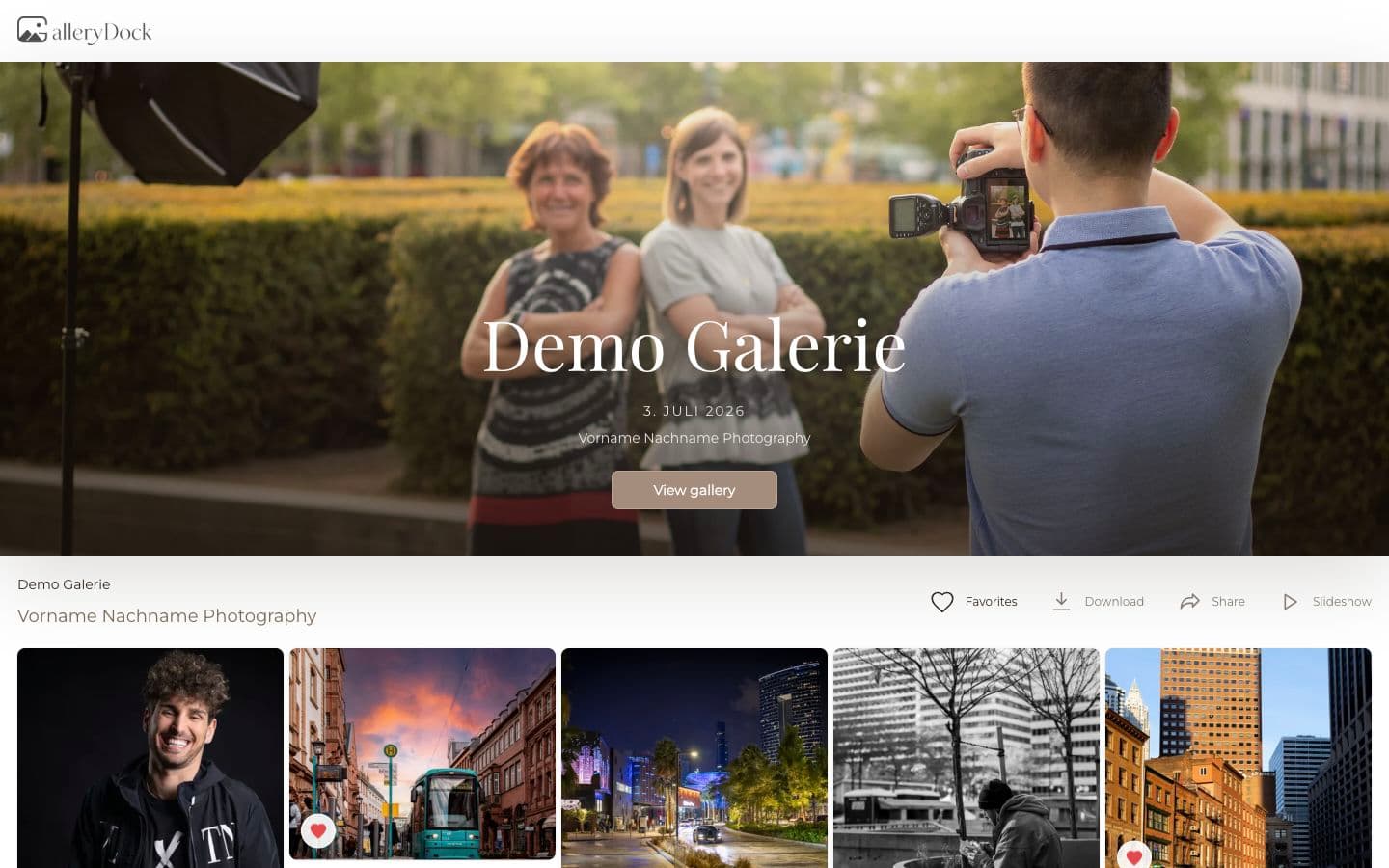
Online photo proofing is the step between showing a client a set of images and receiving a decision you can actually use. GalleryDock keeps favorites, image-specific feedback, private access, and the next delivery step inside one client gallery, so you do not have to reconstruct a selection from screenshots, filenames, email threads, or text messages.
Why proofing gets messy
A proofing gallery is useful because it gives every decision a stable place. The client can compare images at a useful size, return later, and mark the exact frames they want. You receive a selection that still makes sense when the message thread has moved on.
A screenshot may show the right pose, but it often hides the filename, crop, sequence, and related feedback. In a gallery, the favorite remains attached to the source image you uploaded.
Clients should not have to copy IMG numbers into an email. They choose visually, while you keep the selection tied to the exact media record used in your workflow.
When a client asks for a tighter crop or a small retouch, the note is most useful beside that image—not mixed into a long conversation about several different frames.
A practical workflow
The goal is not to add another tool to the project. It is to replace the loose handoffs that happen before editing begins with one predictable client experience.
01
Create a gallery for the job and upload the proofs or edited previews the client may choose from. Keep the set focused enough that the decision still feels manageable.
02
The client opens the gallery in a browser without installing software. You can use a private link and add password protection when the assignment calls for another access layer.
03
The client marks the photographs that should move forward. Feedback remains connected to the relevant image, which makes the next edit or approval easier to interpret.
04
Once the shortlist is clear, you can retouch the chosen frames, prepare downloads, create a final delivery gallery, or offer additional images without starting the conversation over.
What clients notice
Clients rarely care which internal system a studio uses. They care that the images are easy to review, their choices are not lost, and the next step is clear. A branded gallery turns that small operational moment into a stronger client experience.
Clients choose from the actual photographs rather than translating visual preferences into filenames. That lowers the chance of selecting the wrong frame and makes reviewing more enjoyable.
A client can revisit the gallery from a laptop or phone. That matters when a couple, marketing contact, or portrait client wants time to compare several close options.
You can see which images moved forward and what was said about them. The shortlist becomes an input for your next production step rather than another message to decode.

Comparison
A transfer service can deliver files, and a cloud folder can store them. Photo proofing has a different job: it must help a client compare, select, and explain a decision while keeping that decision attached to the images.
| Approach | Best for | Tradeoff |
|---|---|---|
| Email attachment | A very small number of reference files | No useful review view and feedback separates from the image |
| Transfer link | Sending final files once a decision is complete | Built for transfer, not comparing and confirming favorites |
| Cloud folder | Shared storage and internal file access | Clients still need another way to report selections |
| Messaging app | A quick informal question | Screenshots and comments become difficult to reconcile later |
| GalleryDock proofing gallery | Client favorites, review, and a reliable next step | Requires the photographer to prepare a focused gallery first |
A client compares expressions, poses, and crops before you spend time on final retouching. Their shortlist tells you which frames must receive production attention.
A couple reviews the story together and marks the photographs they want considered for an album, slideshow, or smaller highlight set.
A marketing contact gathers internal preferences in one visual set instead of forwarding several disconnected email opinions back to the photographer.
Frequently asked questions
Online photo proofing lets clients review images in a browser, mark favorites, and give feedback before the photographer completes retouching or final delivery.
No. A GalleryDock client gallery opens in a modern browser on desktop, tablet, or mobile.
Yes. You can upload proofs or previews, collect the shortlist, and then retouch only the images that move forward.
GalleryDock galleries use a private link and can also be protected with a password when your client workflow needs it.
Not always. Proofing is about reaching a decision. Final delivery is about releasing the completed files. Both steps can happen in GalleryDock, but they have different goals.
Upload the images the client is genuinely allowed to choose from. Use consistent previews, clear gallery organization, and enough quality for a confident visual decision.
Related resources
Pricing
Free forever
0 EUR
EUR 0 per month
Perfect for sharing your first galleries professionally.
Start free, no credit card required
Monthly
19 EUR
EUR 228 billed yearly. plus VAT
Ideal for photographers who regularly deliver client galleries.
For regular client delivery
Monthly
29 EUR
EUR 348 billed yearly. plus VAT
For photographers managing many projects, videos and growing storage.
For regular client delivery
Create a GalleryDock account, build a focused proofing gallery, and collect favorites without asking clients to manage filenames or screenshots.
Create a free account