Read the instructions
Check whether the photographer requested a fixed number, a shortlist, or examples for discussion.
Client favorite selection
Learn how clients can mark, review, remove, and confirm favorite photos in a GalleryDock client gallery on desktop or mobile.

Quick answer
To mark favorites in a client gallery, open the shared gallery, select the heart on each chosen photo, review the complete favorite set, and tell the photographer when the selection is ready. In GalleryDock, the gallery keeps one shared selection state, so clients should agree before changing or confirming choices rather than expecting separate private lists for each viewer.
Before selecting
A useful favorite list begins with a clear purpose and a shared understanding of how many photographs belong in the final set.
Check whether the photographer requested a fixed number, a shortlist, or examples for discussion.
Open the current project link so older galleries and previous selections do not become mixed.
If several people share the link, decide who may change the shared favorite set.
A favorite marks preference; it is not automatically payment, legal acceptance, or retouching approval.
Selection workflow
Move from broad visual review to a deliberate final set without losing track of what has already been selected.
01
Review the complete story once before making final choices from the first few images.
02
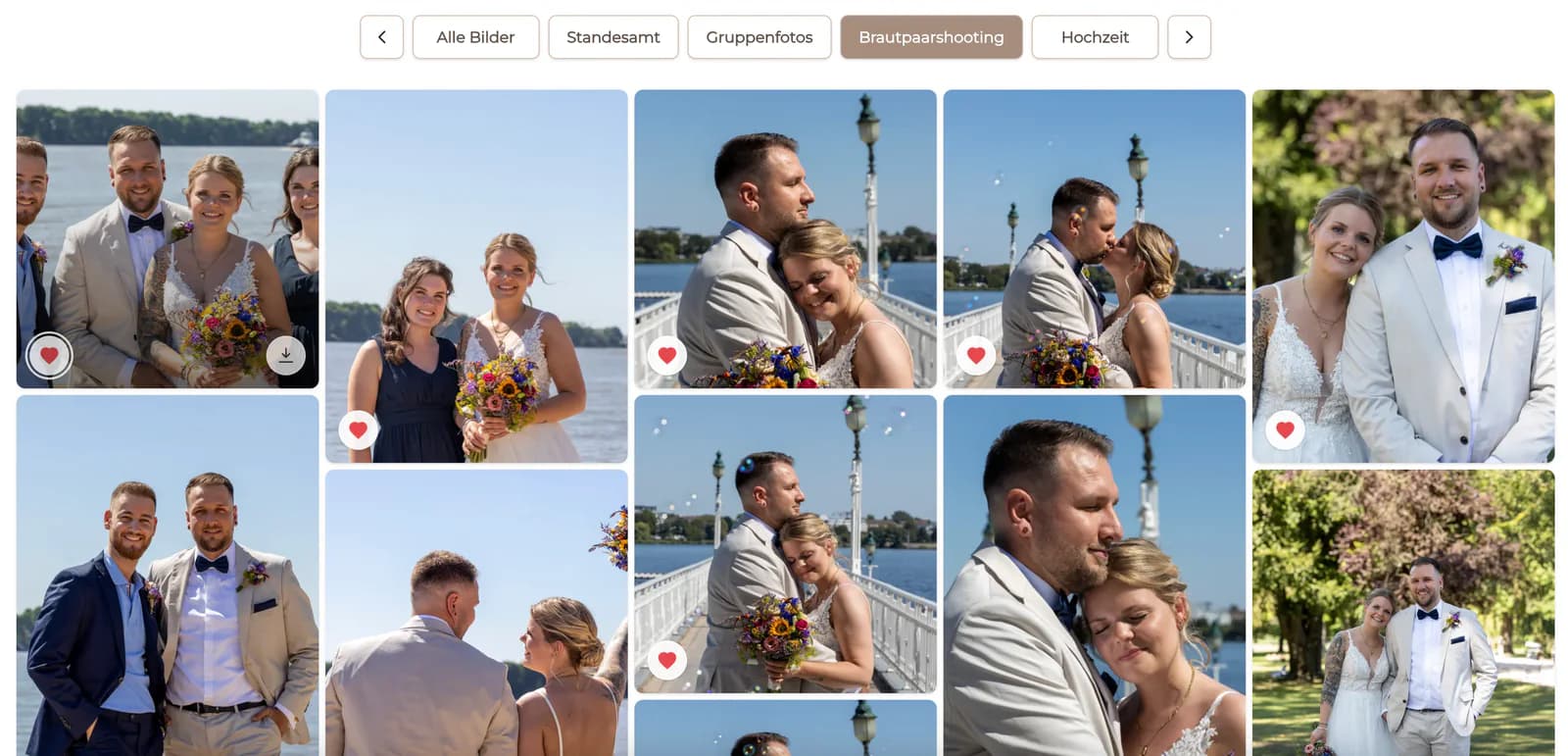
Use the heart on a thumbnail or full image to add that photograph to favorites.
03
Open the filtered favorite set and remove duplicates, near-identical frames, or accidental choices.
04
Send the photographer the requested confirmation after the favorite set is complete.
Avoid confusion
A shared gallery works best when clients treat the selected state as a collaborative result rather than separate private wish lists.
Anyone with the authorized access may affect the shared selection, depending on the gallery setup.
Use comments or a direct conversation before replacing another reviewer's choices.
A final count and visual pass prevents an incomplete list from being treated as finished.
Finish the selection by the photographer's requested date so retouching or album work can begin.

Comparison
Use a method that keeps each choice tied to the correct photograph and preserves one reviewable result.
| Approach | Best for | Tradeoff |
|---|---|---|
| Gallery favorites | Visual selection in the shared gallery | Reviewers must coordinate one shared state |
| Email filename list | A short selection with stable filenames | Easy to mistype or omit identifiers |
| Screenshots | Explaining one visual question | Weak for a complete auditable selection |
| Messenger messages | Quick discussion | Choices become scattered across a chat |
| Spreadsheet | Production tracking after selection | Less natural for clients reviewing photographs |
A client marks the agreed number of portraits for final retouching.
A couple creates one shared set before the album sequence is planned.
A coordinator verifies that every required person has one chosen image.
Frequently asked questions
Open the photograph or its thumbnail and select the heart control. The filled state shows that the image is currently a favorite.
Select the active heart again, then recheck the filtered favorite set to confirm that the photo is gone.
This workflow uses one shared gallery state. Reviewers should coordinate rather than assume that each person has an isolated private list.
Not automatically. A favorite identifies a preferred image; the photographer should define any separate retouching or final-approval step.
Yes. Use the mobile gallery and review the final set carefully because small-screen taps can be easier to make accidentally.
Follow the delivery instructions and send the requested confirmation after the list has been reviewed and finalized.
Related resources
Pricing
Free forever
0 EUR
EUR 0 per month
Perfect for sharing your first galleries professionally.
Start free, no credit card required
Monthly
19 EUR
EUR 228 billed yearly. plus VAT
Ideal for photographers who regularly deliver client galleries.
For regular client delivery
Monthly
29 EUR
EUR 348 billed yearly. plus VAT
For photographers managing many projects, videos and growing storage.
For regular client delivery
Create a GalleryDock gallery, explain the shared favorite workflow, and review the final set before production continues.
Create a free account